
What is live intelligence — and how Jiddu Context helps you follow political speech in real time
Political speech moves faster than careful analysis. Jiddu Context turns a live interview or debate into a workspace you can inspect while the conversation is still happening.
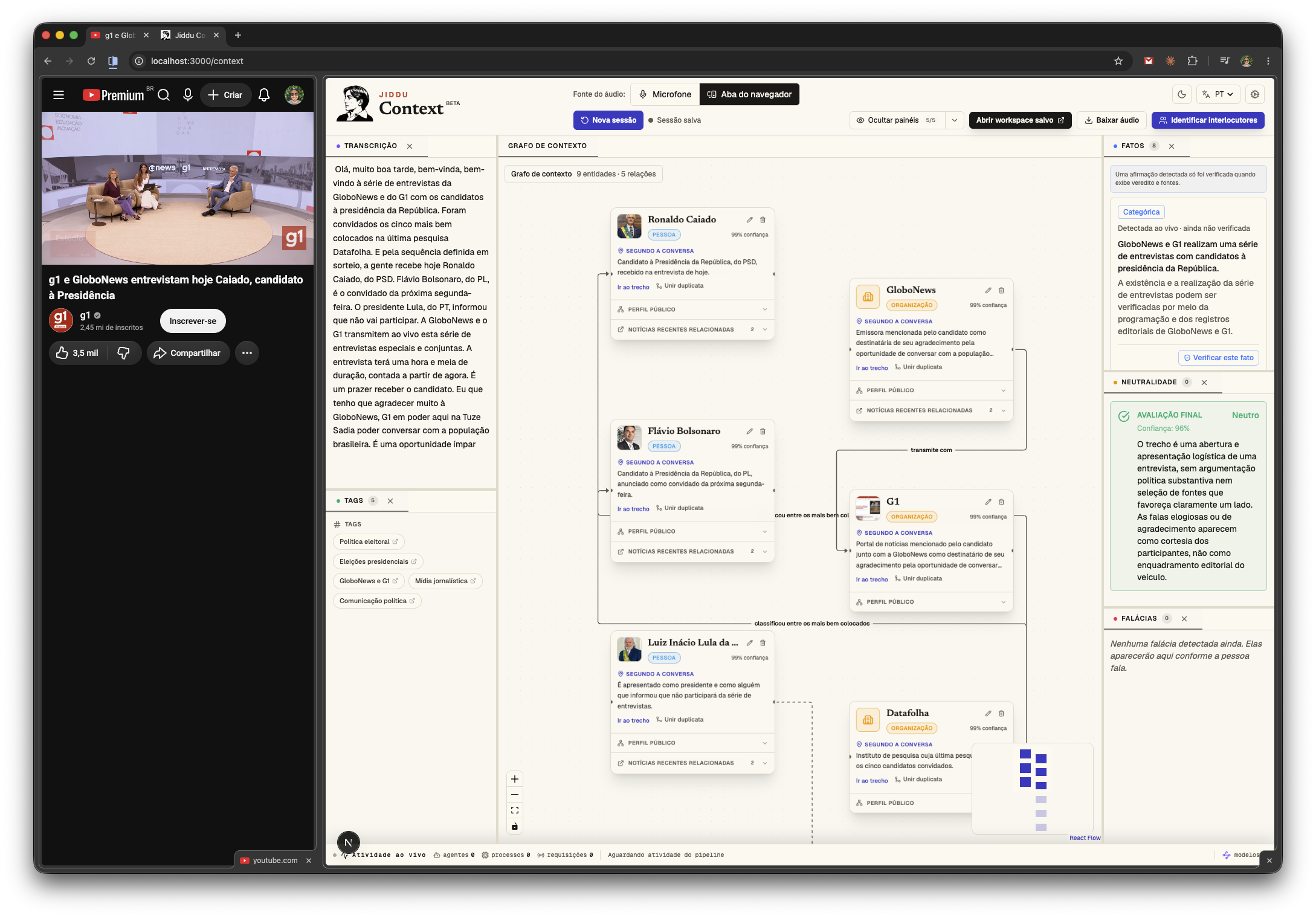
A political interview can produce dozens of names, numbers, accusations, comparisons, and promises in a few minutes. By the time a viewer searches for one claim, the conversation has already moved on.
Jiddu Context turns that stream of speech into a workspace. It listens through the microphone or a browser tab, transcribes the conversation, maps the people and organizations mentioned, and organizes claims, sources, topics, neutrality signals, and possible fallacies as the session develops.
Jiddu Context is a live intelligence workspace built on an orchestrated multi-agent architecture.
Why launch it now?
The next election cycle will put a large volume of political speech in front of voters, journalists, researchers, and campaign observers. Brazil holds the first round of its 2026 general election on October 4, with a possible second round on October 25, according to the official electoral rules published by the Superior Electoral Court. The next regularly scheduled U.S. federal general election, including the midterms, is November 3, according to the Federal Election Commission.
During this period, candidates will appear in debates, long-form interviews, press conferences, podcasts, radio programs, and live streams. Each format makes careful follow-up difficult: a factual claim may depend on an older statistic, a name may refer to several people, and a persuasive phrase may sound conclusive without presenting evidence.
Context keeps these elements visible without forcing the user to pause the conversation and open a trail of disconnected searches.
What Jiddu Context does
A Context session combines several forms of analysis around the same transcript:
- Live transcription: captures audio from a microphone or browser tab and keeps the conversation readable as it happens.
- Speaker identification: separates speakers and lets the user review their names after the session.
- Context graph: maps people, organizations, institutions, events, and the relationships mentioned in the conversation.
- Claims and sources: detects verifiable statements, searches for supporting material, and distinguishes a sourced verdict from a claim that still needs review.
- Neutrality and fallacies: points to language that may deserve closer examination and explains the reason for the signal.
- Topics and navigation: groups recurring subjects and links findings back to the relevant part of the transcript.
The saved workspace preserves the structure of the session so the user can revisit a claim, correct a participant's name, inspect a source, or compare parts of the conversation later.
Why we use multiple agents
Transcription, entity resolution, source research, claim verification, neutrality analysis, and fallacy detection are different jobs. In Context, specialized agents handle these jobs around a shared session. The transcript gives them a common timeline, and the orchestrator keeps their results connected to the relevant people and passages.
This separation also makes the interface easier to audit. A source appears with the claim it is meant to support. A neutrality or fallacy signal includes an explanation. A person or organization appears in the graph with the passage that introduced it. The user can inspect the chain instead of receiving a single opaque answer.
A practical election use case
Suppose a candidate says that an indicator fell by 40%, attributes the result to a government program, and names an institution responsible for the data. Context can keep the exact passage in the transcript, add the candidate and institution to the graph, identify the numerical claim, and look for recent sources related to it.
A journalist can use the saved workspace as a reporting notebook. A researcher can compare recurring themes across an interview. A voter can return to the original wording instead of relying on a clipped quote or a summary posted later.
The same workflow applies to debates in Brazil, U.S. midterm interviews, legislative hearings, public meetings, and any conversation in which the relationship between a statement and its evidence matters.
What it does not do
Context does not decide whether a candidate is trustworthy, infer hidden intentions, or tell anyone how to vote. Its analyses are automated and can be wrong. A transcript may mishear a name or number; an entity may be matched to the wrong person; a recent source may mention the same subject without proving the claim; and a neutrality or fallacy signal may depend on interpretation.
Treat every result as a path for closer inspection. The transcript, cited sources, and original recording remain more important than a label produced by the system.
You can open Jiddu Context and start a session from your microphone or a browser tab.
Frequently asked questions
- Does Jiddu Context decide whether a candidate is lying?
- No. It identifies claims, looks for relevant sources, and shows the evidence it found. The user still needs to inspect whether the sources address the exact statement and whether the conclusion is justified.
- Can Context analyze a debate playing in my browser?
- Yes. You can select a browser tab as the audio source. Context can also listen through the microphone for an in-person conversation or audio playing outside the browser.
- What can I review after the session ends?
- You can revisit the transcript, identify speakers, inspect entities and relationships, open cited sources, and review the neutrality, fallacy, fact, and topic panels saved with the workspace.